Tutorial 11 · The age of computing
Autocrafting: encoded recipes, recipe dispenser and crafting processor
Autocrafting in Rustfall is three parts added to a data network: recipes encoded at the recipe terminal, a recipe dispenser that pushes them into an auto crafter (3 × 3 grid crafting) or into a neighbouring machine (processing), and a crafting processor that runs the job. Whatever the network knows how to make is marked in gold in the terminal: one click, an amount, Enter.
- Advanced
- 7 steps
- 25 blocks in the 3D scene
- The age of computing
What you need
Building the scene…
- Step 1 of 7
Start from a data network
You need the network from the data network tutorial: a powered Network Controller, a trunk of Dense Data Cable and a stocked Drive Bay. Crafting takes its ingredients from that stock and returns its results to it.
- Channels
- 64 per controller face, 64 per dense cable
- Bay
- 10 disks
Place at this step
- Step 2 of 7
Place the recipe terminal and encode
Place the Recipe terminal on the cable. Slide in a Blank recipe, lay the recipe out in the grid, and encode.
WhyAn encoded recipe is either a crafting recipe (a 3 × 3 grid, made by the auto crafter) or a processing recipe (what goes into a machine and what comes out). Hover over an encoded recipe and it shows itself in pictures.
- Blank recipes
- 5 plastic, 3 redstone, 1 quartz → 4 recipes
- Recipe terminal
- 1 crafting terminal + 1 engineering circuit
Place at this step
- Step 3 of 7
Crafting: the dispenser and the auto crafter
Place a Recipe dispenser against the cable, and put an Auto crafter right next to it. Store your crafting recipes in the dispenser: it pushes them to the auto crafter, which crafts.
WhyThe dispenser holds the recipes; the auto crafter touching it makes whatever it is pushed. The auto crafter keeps its job, and any result that doesn't fit: nothing is lost if the network rebuilds.
- Recipe dispenser
- 4 steel, 2 calculation circuits, 2 crafting tables, 1 engineering circuit
- Auto crafter
- 4 steel, 2 glass, 1 calculation circuit, 1 crafting table, 1 logic circuit
Place at this step
Common mistakePlacing the auto crafter away from the dispenser: it has to touch it, because the dispenser is what pushes recipes into it.
- Step 4 of 7
Processing: the dispenser and a machine
A second dispenser, this time touching an Electric Furnace. A processing recipe pushes its ingredients (iron ore) into it; a Network Intake facing the furnace brings the ingots back to the network through a piece of Data Cable.
WhyIt is what comes back to the network that completes the job: without the intake, the ingots stay in the furnace and the order waits forever. The furnace itself connects to the power network like any other machine.
- Electric Furnace
- 75 RC/s, 2 s
- Network Intake
- 4 steel, 1 logic circuit, 1 sticky piston
Place at this step
Common mistakeForgetting the return path: a processing recipe with no intake (or no conduit to a chest on the network) never finishes.
- Step 5 of 7
Build the crafting processor
A processor is a group of touching blocks: a unit (“Crafting processor”), storage (“Crafting Storage” from 1k to 64k) and co-processors (“Crafting accelerator”). Put it against the cable.
WhyA job pushes as many recipes per pass as the processor has co-processors, plus one: co-processors move several steps forward at once. Touching, the blocks share one steel rack and form a bay of modules.
- Unit
- 4 steel, 2 calculation circuits, 2 logic circuits, 1 data cable
- Storage
- 1 unit + 1 storage component (1k, 4k, 16k, 64k)
- Co-processor
- 1 unit + 1 engineering circuit
- Recipes per pass
- co-processors + 1
Place at this step
- Step 6 of 7
Order at the crafting terminal
Place a Crafting Terminal on the cable. Whatever the network can make is marked in gold: a click opens the crafting window, you choose the amount (typed, −/+, 1/16/64/256) and Enter starts it.
WhyThe window shows what the order will take, each ingredient tied to the item by a wire: gold, it is in stock; brass, it will be crafted along the way; crimson, it is missing. The plan is recalculated for every amount.
- Crafting Terminal
- 1 terminal + 1 crafting table + 1 calculation circuit
Place at this step
TipOn any hovered item, O (or R) opens its recipes in the catalogue, U its uses.
- Step 7 of 7
Follow, cancel, resume
The terminal's Crafting tab shows what is being made at the top (progress, cancel) and, below, everything the recipes can make. A job reserves what it takes from stock straight away, and returns the result to the network when it is done; cancelled, it gives back what it was holding.
WhyA running job is saved in one of the processor's blocks (plan, held ingredients, steps): a server restart or a network rebuild picks it up exactly where it was.
Common mistakeStarting a big order with an ingredient in crimson: it is missing. Top up the stock, or encode the recipe that makes it, before you start.


What you end up with
A network that crafts on demand: encoded recipes, an auto crafter for crafting-table recipes, a furnace driven by a processing recipe, and a processor running the orders placed at the terminal.
In the in-game demo
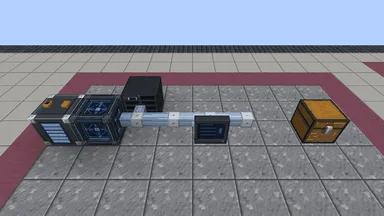
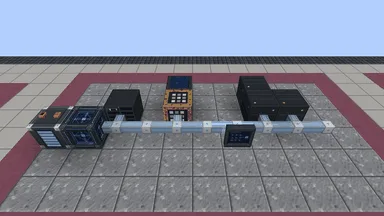
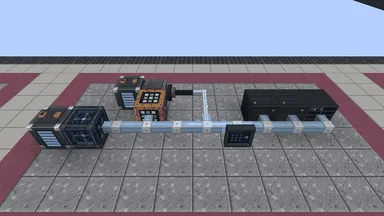
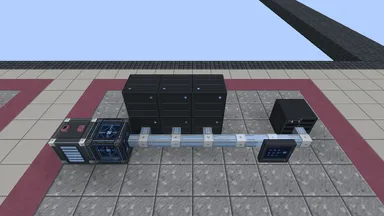
These builds exist for real in Rustfall’s “Demo & help” world (the game’s Esc menu): every stand runs, and its sign says what it does. Here are those signs, as written in the game.
Frequently asked questions
What is the difference between a crafting recipe and a processing recipe?
A crafting recipe is a 3 × 3 grid made by the auto crafter touching the recipe dispenser. A processing recipe pushes its ingredients into the machine next to the dispenser (a furnace, a crusher) and waits for the result to come back to the network.
What are co-processors for?
A job pushes as many recipes per pass as the processor has co-processors, plus one: each co-processor (Crafting accelerator) moves one more step forward at a time.
What happens to an order if the server restarts?
It resumes as it was: the running job is saved in one of the processor's blocks, with its plan, the ingredients it holds and what it is waiting for from the machines.
How do I start a craft?
At the terminal, the items the network can make are marked in gold: a click opens the crafting window, you choose the amount and Enter starts it.
Related blocks and items
 Recipe terminal
 Blank recipe
 Encoded recipe
 Recipe dispenser
 Auto crafter
 Crafting processor
 1k Crafting Storage
 4k Crafting Storage
 16k Crafting Storage
 64k Crafting Storage
 Crafting accelerator
 Crafting Terminal
 Wireless Crafting Terminal
 Network Intake
 Network Dispenser
 Network Controller
 Dense Data Cable
 Data Cable
 Drive Bay
 Electric Furnace
 Engineering Circuit
 Calculation Circuit
What’s next
- Tutorial 12
Nuclear power
Nuclear power in Rustfall: centrifuge, fuel rods, a hand-built reactor, control rods, the turbine, core meltdown and radiation, built block by block.
- Tutorial 08
Automatic selling: freight quay
Sell without lifting a finger in Rustfall: the freight quay ships your ingots to the network every 5 seconds, and the crown vault keeps what they earn.
- Tutorial 17
Understanding the economy
The Rustfall economy: crowns, selling to the network, the price B / (1 + P / K), the cap on each item, freight quay thresholds and money sinks.